Overview
This guide walks through how to submit a video for processing using the SplitStep API. You submit a job and receive results via a webhook when the job completes or fails.
Prerequisites
You will need:
- An API key (provided)
- The API base URL (provided)
- A webhook URL
- A webhook signing secret (provided)
- Python with the
clickandrequestspackages installed - The
splitstep_client.pyscript (provided below) - A job request JSON file (see the example provided below)
Submitting a Job
Run the script from your terminal. Your API key can be passed via the SPLITSTEP_API_KEY
environment variable (recommended) or directly with the --api-key flag:
# Using the SPLITSTEP_API_KEY environment variable (recommended)
SPLITSTEP_API_KEY=your_key python splitstep_client.py send path/to/job_request.json

# Or passing the key directly
python splitstep_client.py send path/to/job_request.json --api-key your_key
The script will print the immediate queuing response as JSON, for example:
{
  "job_id": "a1b2c3d4-...",
  "video_id": "your_match_id",
  "status": "queued",
  "message": "Job queued successfully"
}
If a required field is missing or invalid, the API will reject the request immediately with an error, for example:
{
  "detail": {
    "code": "MISSING_REQUIRED_FIELD",
    "category": "invalid_input",
    "message": "A field required for this job type is missing from the request.",
    "detail": "validation failed for: body.MatchID"
  }
}
See Error Codes for the full list and for how to handle codes your integration does not recognise.
splitstep_client.py
Reference implementation of the client script used above:
splitstep_client.py
#!/usr/bin/env python3
import json
from datetime import datetime, timezone

import click
import requests

BASE_URL = "https://api.example.com"  # dummy endpoint — replace with your assigned URL
LIST_COLUMNS = ("job_id", "video_id", "status", "time_in_status")


def format_duration(duration: float) -> str:
    """Format a duration in seconds into a human readable string.

    Parameters
    ----------
    duration : float
        Duration in seconds to format

    Returns
    -------
    str
        Formatted duration string
    """
    if duration < 1:
        return f"{duration * 1000:.0f}ms"
    elif duration < 60:
        return f"{duration:.1f}s"
    elif duration < 3600:
        minutes = str(int(duration // 60))
        seconds = str(int(duration % 60))
        seconds = "0" + seconds if len(seconds) == 1 else seconds
        return f"{minutes}m{seconds}s"
    else:
        hours = str(int(duration // 3600))
        minutes = str(int((duration % 3600) // 60))
        minutes = "0" + minutes if len(minutes) == 1 else minutes
        return f"{hours}h{minutes}m"


def echo_job_table(jobs, columns=LIST_COLUMNS, empty_message="No in-flight jobs."):
    """Print a table of jobs.

    Parameters
    ----------
    jobs : list of dict
        Job objects to display
    columns : tuple of str
        Column keys to display. ``time_in_status`` is computed from ``updated_at``;
        every other name is read from the job dict.
    empty_message : str
        Printed when ``jobs`` is empty
    """
    if not jobs:
        click.echo(empty_message)
        return

    now = datetime.now(timezone.utc)
    rows = []
    for job in jobs:
        row = []
        for column in columns:
            if column == "time_in_status":
                updated_at = job.get("updated_at")
                if updated_at:
                    updated = datetime.fromisoformat(updated_at)
                    row.append(format_duration((now - updated).total_seconds()))
                else:
                    row.append("-")
            else:
                row.append(str(job.get(column, "") or ""))
        rows.append(tuple(row))

    widths = [len(h) for h in columns]
    for row in rows:
        for i, cell in enumerate(row):
            widths[i] = max(widths[i], len(cell))

    click.echo("  ".join(h.ljust(widths[i]) for i, h in enumerate(columns)))
    for row in rows:
        click.echo("  ".join(cell.ljust(widths[i]) for i, cell in enumerate(row)))


def echo_list_jobs(api_key, columns=LIST_COLUMNS):
    """Fetch in-flight jobs and print them as a table.

    Parameters
    ----------
    api_key : str
        API key for authenticating with the API
    columns : tuple of str
        Column keys to display, forwarded to ``echo_job_table``
    """
    response = requests.get(
        f"{BASE_URL}/jobs",
        headers={"X-Api-Key": api_key},
    )
    payload = response.json()
    if response.status_code != 200:
        click.echo(json.dumps(payload, indent=2))
        return

    echo_job_table(payload.get("jobs") or [], columns=columns)


def list_jobs_command(columns=LIST_COLUMNS):
    """Build the ``list`` click command.

    Parameters
    ----------
    columns : tuple of str
        Column keys to display

    Returns
    -------
    click.Command
        Command that lists in-flight jobs
    """

    @click.command(name="list")
    @click.option("--api-key", envvar="SPLITSTEP_API_KEY", required=True)
    def list_jobs(api_key):
        """List in-flight (queued or processing) jobs for this API key.

        Parameters
        ----------
        api_key : str
            API key for authenticating with the API. Falls back to the
            SPLITSTEP_API_KEY environment variable.
        """
        echo_list_jobs(api_key, columns=columns)

    return list_jobs


@click.group()
def cli():
    """Submit jobs to the SplitStep API, list in-flight jobs, check status, or remove queued jobs."""


@cli.command()
@click.argument("job_request_path", type=click.Path(exists=True))
@click.option("--api-key", envvar="SPLITSTEP_API_KEY", required=True)
def send(job_request_path, api_key):
    """Send a job request to the SplitStep API.

    Parameters
    ----------
    job_request_path : str
        Path to a JSON file containing the job request payload.
    api_key : str
        API key for authenticating with the API. Falls back to the
        SPLITSTEP_API_KEY environment variable.
    """
    with open(job_request_path, "r") as f:
        data = json.load(f)

    response = requests.post(
        f"{BASE_URL}/jobs",
        headers={"X-Api-Key": api_key, "Content-Type": "application/json"},
        json=data,
    )

    click.echo(json.dumps(response.json(), indent=2))


@cli.command()
@click.argument("job_id")
@click.option("--api-key", envvar="SPLITSTEP_API_KEY", required=True)
def status(job_id, api_key):
    """Get the status of a job from the SplitStep API.

    Parameters
    ----------
    job_id : str
        ID of the job to look up, as returned when the job was submitted.
    api_key : str
        API key for authenticating with the API. Falls back to the
        SPLITSTEP_API_KEY environment variable.
    """
    response = requests.get(
        f"{BASE_URL}/jobs/{job_id}",
        headers={"X-Api-Key": api_key},
    )
    click.echo(json.dumps(response.json(), indent=2))


@cli.command()
@click.argument("job_id")
@click.option("--api-key", envvar="SPLITSTEP_API_KEY", required=True)
def remove(job_id, api_key):
    """Remove a queued job from the SplitStep API.

    Only jobs that are still queued can be removed. Processing jobs are rejected.

    Parameters
    ----------
    job_id : str
        ID of the job to remove.
    api_key : str
        API key for authenticating with the API. Falls back to the
        SPLITSTEP_API_KEY environment variable.
    """
    response = requests.delete(
        f"{BASE_URL}/jobs/{job_id}",
        headers={"X-Api-Key": api_key},
    )
    payload = response.json() if response.content else {}

    if response.status_code == 200:
        click.echo(f"Removed job {job_id} from queue.")
        return

    error = payload.get("error") or {}
    code = error.get("code", "")
    detail = error.get("detail", "")

    if response.status_code == 404 or code == "JOB_NOT_FOUND":
        click.echo(f"Job {job_id} not found.")
    elif response.status_code == 409 or code == "JOB_NOT_REMOVABLE":
        if "job_processing" in detail:
            reason = "already processing"
        elif "job_completed" in detail:
            reason = "already completed"
        elif "job_failed" in detail:
            reason = "already failed"
        else:
            reason = detail or "not removable"
        click.echo(f"Cannot remove job {job_id}: {reason}.")
    elif response.status_code == 401 or code == "UNAUTHORIZED":
        click.echo("Unauthorized.")
    else:
        message = error.get("message") or response.reason
        click.echo(f"Failed to remove job {job_id}: {message}")


cli.add_command(list_jobs_command())


if __name__ == "__main__":
    cli()
Job Request Format
The job request is a JSON file with the following fields.
| Field | Type | Description |
|---|---|---|
MatchID |
string | A unique identifier for this video. |
VideoUrl |
string (URL) | An Azure Blob Storage URL to the video file, of the form https://<account>.blob.core.windows.net/<container>/<blob>, normally with a SAS token. Other hosts are not supported. |
InitialTopPlayer |
string | Name of the player starting at the top of the court at the beginning of the video. |
InitialBottomPlayer |
string | Name of the player starting at the bottom of the court at the beginning of the video. |
StartTime |
float | Time in seconds from the start of the video to begin processing. |
EndTime |
float | Time in seconds from the start of the video to end processing. |
SetGameScores |
array of [number, number] |
The game scores for each set, from the perspective of the top and bottom player respectively. Each entry is a two-element array [top_player_games, bottom_player_games]. For example, a match won 6–4, 6–1 by the top player would be [[6, 4], [6, 1]]. |
FixedCamera |
boolean | Whether the camera is stationary (e.g. on a tripod or fence mount) throughout the match. |
Ad |
boolean | Whether advantage scoring is used. If true, a player must win two consecutive points after deuce to win the game. |
MatchDate |
string (date), optional | The date the match was played, as YYYY-MM-DD. |
Example
{
    "MatchID": "my_match_001",
    "VideoUrl": "https://example.blob.core.windows.net/videos/match.mp4?...",
    "InitialTopPlayer": "Smith",
    "InitialBottomPlayer": "Jones",
    "StartTime": 120.0,
    "EndTime": 3600.0,
    "SetGameScores": [[6, 3], [7, 5]],
    "FixedCamera": true,
    "Ad": false,
    "MatchDate": "2026-05-14"
}
Video Guidelines
Specifications
| Resolution | 1080p (1920×1080) or higher. Enforced; lower resolutions are rejected. |
| Frame rate | 30 fps minimum, 60 fps recommended. Enforced; 29.97 fps (NTSC) and higher is accepted. |
| Format | MP4 (H.264) preferred. Any container and codec ffmpeg can decode is accepted. |
| File size | Less than 8,000,000,000 bytes (8 GB). Enforced. |
| Length | Adjust StartTime and EndTime to cover complete games, consistent with the set game scores provided in SetGameScores |
| Mode | Singles only — doubles matches are not supported at this time |
Camera Setup
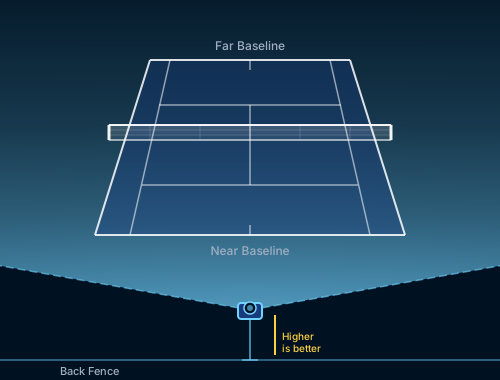
- Behind the baseline at one end of the court
- Centered on the court, aligned with the center mark
- Elevated — the higher the better
- The full court must be visible, including both baselines
- Use a tripod or fence mount for a fixed camera; if there is panning, set
FixedCameratofalse
Webhook Responses
Provide your webhook URL to us when your API key and webhook secret is issued. We deliver job notifications to that URL.
You will receive two webhook notifications per job: one when the job is first queued, and one when processing completes or fails.
Every webhook is signed; see Verifying Webhooks below.
Job Queued
Sent immediately after a successful submission:
{
  "job_id": "a1b2c3d4-...",
  "video_id": "my_match_001",
  "status": "queued",
  "message": "Job queued successfully"
}
Job Completed
Sent when processing finishes successfully:
{
  "job_id": "a1b2c3d4-...",
  "video_id": "my_match_001",
  "status": "job_completed",
  "message": "Job completed successfully",
  "strokes_url": "https://...",
  "players_url": "https://...",
  "trajectories_url": "https://...",
  "trimmed_video_url": "https://..."
}
| Field | Description |
|---|---|
strokes_url |
Azure Blob SAS URL to a JSON file containing the stroke-by-stroke analysis results (see Result Schemas), valid for 7 days. |
players_url |
Azure Blob SAS URL to a JSON file containing frame-by-frame player tracking data (see Players Schema), valid for 7 days. |
trajectories_url |
Azure Blob SAS URL to a JSON file containing frame-by-frame ball trajectory data (see Trajectories Schema), valid for 7 days. null if no trajectory data was produced for this job. |
trimmed_video_url |
Azure Blob SAS URL to the trimmed and re-encoded video used for processing, valid for 7 days. |
Job Failed
Sent if an error occurs at any stage of processing:
{
  "job_id": "a1b9c3d4-...",
  "video_id": "my_match_001",
  "status": "job_failed",
  "message": "Failed to download video: HTTP 403 fetching video: ...",
  "error": {
    "code": "VIDEO_UNREACHABLE",
    "category": "invalid_input",
    "message": "The video could not be retrieved. The SAS token may have expired, or the blob may have been moved or deleted.",
    "detail": "HTTP 403 fetching video: ...",
    "step": "downloading_video"
  }
}
Branch on error.code. Use error.message for end-user display and error.detail for diagnostics.
The top-level message summarizes the failure and includes the underlying error detail; it is
retained for backward compatibility and should not be parsed.
Verifying Webhooks
Your webhook endpoint is a public URL, so you must verify that a request genuinely came from us before acting on it. Every webhook carries a signature computed with a shared secret that only the two of us hold. This secret is not the same value as your API key.
import base64
import hashlib
import hmac

def verify(raw_body: bytes, received_signature: str, secret: str) -> bool:
    digest = hmac.new(secret.encode("utf-8"), raw_body, hashlib.sha256).digest()
    expected = base64.b64encode(digest).decode("utf-8")
    return hmac.compare_digest(expected, received_signature)
Read the signature from the X-HMAC-Signature header and pass it as received_signature.
Checking Job Status
After submitting a job, check its progress with the status command.
SPLITSTEP_API_KEY=your_key python splitstep_client.py status {job_id}
The script prints the status response as JSON.
Response
| Field | Description |
|---|---|
job_id |
The job ID from the URL. |
video_id |
The video ID from the job request you submitted. |
status |
One of queued, job_processing, job_completed, job_failed. |
queued_at |
When the job was accepted, UTC. |
updated_at |
When the status last changed, UTC. For job_processing, this is when a worker picked the job up. |
error |
Same shape as the webhook error object. See Error Codes. |
Example
{
  "job_id": "a1b2b9d4-0000-0000-0000-000000000001",
  "video_id": "my_match_001",
  "status": "job_processing",
  "queued_at": "2026-07-31T18:02:11.482913+00:00",
  "updated_at": "2026-07-31T18:07:03.115204+00:00"
}
Errors
When the request itself fails, the response contains job_id and error only — no status,
video_id, or timestamps. See
Returned when checking job status for the possible codes.
Example
{
  "job_id": "a1b2c3d4-0000-0000-0000-000000000001",
  "error": {
    "code": "JOB_NOT_FOUND",
    "category": "invalid_input",
    "message": "No job was found with that ID.",
    "detail": ""
  }
}
Interrupted Jobs
If a job starts processing and then stops reporting progress — for example because the machine
running it was interrupted — we detect this and mark the job job_failed with the code JOB_STALE,
and notify your webhook:
Example
{
  "job_id": "a1b2c3d4-0000-0000-0000-000000000001",
  "video_id": "my_match_001",
  "status": "job_failed",
  "queued_at": "2026-07-31T18:02:11.482913+00:00",
  "updated_at": "2026-07-31T18:22:03.115204+00:00",
  "error": {
    "code": "JOB_STALE",
    "category": "internal",
    "message": "The job stopped reporting progress. Contact support with the job_id.",
    "detail": "no heartbeat since 2026-07-31T18:11:44.902117+00:00"
  }
}
Listing In-Flight Jobs
List jobs that are still queued or processing with the list command.
SPLITSTEP_API_KEY=your_key python splitstep_client.py list
The script prints a table:
job_id                                video_id       status          time_in_status
a1c2c3d4-0000-0000-0000-000000000001  my_match_001   queued          12m34s
b2c3d4e5-0000-0000-0000-000000000002  my_match_002   job_processing  3m05s
c3d4e5f6-0000-0000-0000-000000000003  my_match_003   queued          45.2s
time_in_status is how long the job has been in its current status. If there are no in-flight jobs,
the script prints No in-flight jobs.
Removing a Queued Job
Remove a job that is still queued with the remove command. Jobs that have already started
processing cannot be removed.
SPLITSTEP_API_KEY=your_key python splitstep_client.py remove {job_id}
On success:
Removed job a1b2c3d4-0000-0000-0000-000000000001 from queue.
The job record is deleted. A later status check for that ID returns JOB_NOT_FOUND.
If the job is already processing:
Cannot remove job b2c3d4e5-0000-0000-0000-000000000002: already processing.
Error Codes
Every error returned by the API or delivered in a job_failed webhook carries an error object
with the same shape.
| Field | Description |
|---|---|
code |
Stable machine-readable identifier. Branch on this. |
category |
invalid_input if the request or video needs to change, internal if the fault is ours. |
message |
Human-readable explanation associated with the error code. Display this to end users. |
detail |
Specific diagnostic message for this occurrence (for example, which field was missing, or the underlying HTTP error). Include this when contacting support. |
step |
Pipeline step that failed. Present on webhook errors only. |
Handling codes you do not recognise
New codes will be added over time as failure modes are identified. Your integration must handle
unknown codes gracefully via a default branch. Where possible, branch on category rather than on
individual codes, so that new codes are handled correctly without a change on your side.
Returned immediately, in the HTTP response
| Code | Status | Meaning |
|---|---|---|
INVALID_REQUEST |
422 | The request body failed schema validation. |
UNAUTHORIZED |
401 | The API key was missing or not recognised. |
MISSING_REQUIRED_FIELD |
422 | A field required for your job type was absent. |
VIDEO_URL_INVALID |
422 | VideoUrl is not an Azure Blob Storage URL. |
QUEUE_ERROR |
503 | The job could not be queued. Contact support. |
Delivered in the webhook
| Code | Category | Meaning |
|---|---|---|
VIDEO_UNREACHABLE |
invalid_input |
The video could not be fetched. Usually an expired SAS token or a deleted blob. |
VIDEO_TOO_LARGE |
invalid_input |
The video exceeds the maximum file size of 8,000,000,000 bytes (8 GB). |
VIDEO_UNREADABLE |
invalid_input |
The video could not be decoded, or contains no video stream. |
VIDEO_RESOLUTION_TOO_LOW |
invalid_input |
The video is below 1920×1080. |
VIDEO_FRAME_RATE_TOO_LOW |
invalid_input |
The video is below 29.9 fps (29.97 fps NTSC is accepted). |
NO_COURT_VISIBLE |
invalid_input |
No tennis court was detected in the video. |
NO_PLAYERS_DETECTED |
invalid_input |
No players were detected in the video. |
NO_STROKES_DETECTED |
invalid_input |
No strokes were detected in the video. |
NO_SERVES_DETECTED |
invalid_input |
A singles match is expected to have serves, but none were found. |
INTERNAL_ERROR |
internal |
An unexpected failure on our side. Contact support with the job_id. |
JOB_STALE |
internal |
The job stopped reporting progress and will not complete. Contact support with the job_id. |
Returned when checking job status
See Checking Job Status.
| Code | Status | Category | Meaning |
|---|---|---|---|
UNAUTHORIZED |
401 | invalid_input |
The API key was missing or not recognised. |
JOB_NOT_FOUND |
404 | invalid_input |
No job with that ID exists for your API key. |
STATUS_UNAVAILABLE |
503 | internal |
Status could not be read right now. |
JOB_STALE |
200 | internal |
The job was marked failed after it stopped reporting progress. Contact support with the job_id. |
Returned when removing a job
| Code | Status | Category | Meaning |
|---|---|---|---|
UNAUTHORIZED |
401 | invalid_input |
The API key was missing or not recognised. |
JOB_NOT_FOUND |
404 | invalid_input |
No job with that ID exists for your API key. |
JOB_NOT_REMOVABLE |
409 | invalid_input |
The job exists but is not queued (for example, it is already processing). |
STATUS_UNAVAILABLE |
503 | internal |
The job store could not be updated right now. |
Result Schemas
A completed job's webhook includes SAS URLs to three JSON files, each documented below:
strokes_url— one record per detected stroke (contact)players_url— frame-by-frame player trackingtrajectories_url— frame-by-frame ball positions
Strokes Schema
The strokes_url file is a JSON array with one element per detected stroke (contact), giving court
and pixel positions, bounce location, ball flight metrics, and score context. Missing values use
type-specific sentinels: -9999.0 for floats, -9999 for integers, and "None" for strings.
Court coordinates
Positions ending in _m are in meters on the court plane. The origin is at court center (net
mid-point). Positive y is toward the top of the video / far baseline; positive x is toward the
right sideline.
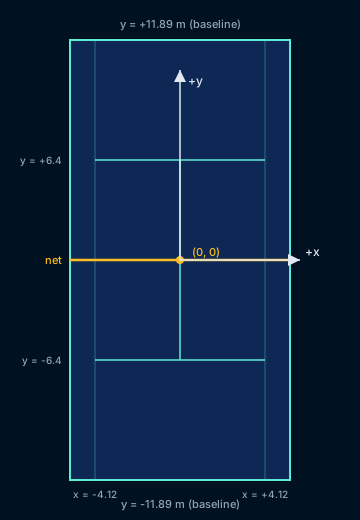
Singles court in meters. Sidelines at x ≈ ±4.12; service lines at y ≈ ±6.4; baselines at
y ≈ ±11.89.
| Field | Type | Description |
|---|---|---|
video_id |
string | Identifier for the processed video / match. |
event_id |
integer | Zero-based index of this stroke across the full results file. |
frame |
integer | Video frame index of the stroke contact. |
time |
float | Time in seconds since the start of the processed video at stroke contact. |
rally_id |
integer | 1-based rally / point identifier from input rally metadata, if provided. |
rally_stroke_number |
integer | 1-based stroke number within the rally, from input rally metadata, if provided. |
player_id |
string | Name of the player who hit the stroke, from input rally metadata, if provided. |
point_score, game_score, set_score |
string | Point, game, and set scores from input rally metadata, if provided, as hyphenated pairs from the server's perspective (e.g. "30-15", "3-2"). |
pred_rally_id |
integer | Beta 1-based predicted rally / point identifier. |
pred_rally_stroke_number |
integer | Beta 1-based predicted stroke number within the rally. |
pred_player_id |
string | Beta Predicted name of the player who hit the stroke. |
pred_point_score, pred_game_score, pred_set_score |
string | Beta Predicted point, game, and set scores at the stroke, as hyphenated pairs from the server's perspective (e.g. "30-15", "3-2"). |
stroke_type |
string | Stroke category: serve, groundstroke, or volley. |
stroke_side |
string | Stroke side / technique: forehand, backhand, or overhead. |
stroke_score |
float | Model confidence for the stroke detection (0–1). |
side_score |
float | Model confidence for the stroke side classification (0–1). |
player_x_m, player_y_m |
float | Hitting player position on the court at contact, in meters. |
player_x1_px, player_y1_px, player_x2_px, player_y2_px |
float | Pixel bounding box of the hitting player in the video frame (top-left to bottom-right). |
opponent_x_m, opponent_y_m |
float | Opponent position on the court at contact, in meters. |
opponent_x1_px, opponent_y1_px, opponent_x2_px, opponent_y2_px |
float | Pixel bounding box of the opponent in the video frame. |
speed_kmh |
float | Estimated ball speed after contact, in km/h. |
ang_vel_mag_rpm |
float | Estimated ball spin magnitude, in revolutions per minute (RPM). |
spin_type |
string | Estimated spin class: topspin, backspin, sidespin, or flat. |
initial_height_m |
float | Estimated ball height at contact, in meters. |
height_at_net_m |
float | Estimated ball height when crossing the net plane, in meters. |
net_hit |
boolean | Whether the ball hit the net during the stroke's trajectory. |
bounce_frame |
float | Frame index of the subsequent ball bounce. |
bounce_score |
float | Model confidence for the bounce detection (0–1). |
bounce_x_m, bounce_y_m |
float | Bounce location on the court in meters. |
bounce_x_px, bounce_y_px |
float | Bounce location in video pixel coordinates. |
in |
boolean | Whether the ball was judged in after the stroke (based on bounce / landing). |
line_confidence |
float | Confidence associated with the in/out line call (0.5–0.9). |
Example
[
  {
    "video_id": "my_match_001",
    "event_id": 0,
    "frame": 1060,
    "time": 17.67,
    "rally_id": 1,
    "rally_stroke_number": 1,
    "player_id": "client_player_id",
    "point_score": "0-0",
    "game_score": "0-0",
    "set_score": "0-0",
    "pred_rally_id": 1,
    "pred_rally_stroke_number": 1,
    "pred_player_id": "client_player_id",
    "pred_point_score": "0-0",
    "pred_game_score": "0-0",
    "pred_set_score": "0-0",
    "stroke_type": "serve",
    "stroke_side": "overhead",
    "stroke_score": 0.998,
    "side_score": 0.996,
    "player_x_m": 0.52,
    "player_y_m": -11.97,
    "player_x1_px": 985.4,
    "player_y1_px": 480.81,
    "player_x2_px": 1092.1,
    "player_y2_px": 758.45,
    "opponent_x_m": -3.08,
    "opponent_y_m": 14.46,
    "opponent_x1_px": 847.28,
    "opponent_y1_px": 178.75,
    "opponent_x2_px": 875.84,
    "opponent_y2_px": 234.68,
    "speed_kmh": 162.27,
    "ang_vel_mag_rpm": 1788.28,
    "spin_type": "topspin",
    "initial_height_m": 2.481,
    "height_at_net_m": 0.981,
    "net_hit": false,
    "bounce_frame": 1085.0,
    "bounce_score": 0.939,
    "bounce_x_m": -1.311,
    "bounce_y_m": 4.646,
    "bounce_x_px": 901.875,
    "bounce_y_px": 292.5,
    "in": true,
    "line_confidence": 0.9
  }
]
Players Schema
The players_url file is a JSON array with one element per tracked frame, giving the player's court
and pixel position. Missing values use the same sentinels as the
strokes schema.
| Field | Type | Description |
|---|---|---|
frame |
integer | Video frame index. |
player_x_px, player_y_px |
float | Player position in video pixel coordinates. |
player_x_m, player_y_m |
float | Player position on the court in meters (see Court coordinates). |
Example
[
  {
    "frame": 1060,
    "player_x_px": 1038.75,
    "player_y_px": 619.63,
    "player_x_m": 0.52,
    "player_y_m": -11.97
  }
]
Trajectories Schema
The trajectories_url file is a JSON array with one element per tracked ball position, along with
the stroke and bounce frames it's associated with. Missing values use the same sentinels as the
strokes schema.
| Field | Type | Description |
|---|---|---|
frame |
integer | Video frame index of this ball position. |
stroke_frame |
integer | Frame index of the stroke this ball position belongs to. |
bounce_frame |
integer | Frame index of the bounce this ball position belongs to, if any. |
ball_x_px, ball_y_px |
float | Ball position in video pixel coordinates. |
ball_x_m, ball_y_m |
float | Ball position on the court in meters (see Court coordinates). |
ball_z_m |
float | Ball height above the court plane, in meters. |
Example
[
  {
    "frame": 1062,
    "stroke_frame": 1060,
    "bounce_frame": 1085,
    "ball_x_px": 945.2,
    "ball_y_px": 410.8,
    "ball_x_m": 0.31,
    "ball_y_m": -8.14,
    "ball_z_m": 1.62
  }
]
Statistics Schema (Optional)
We can also deliver a statistics-based schema derived from the match analysis. Contact us for more details on fields and delivery format.